Chapter 3 — Electronics You Actually Need to Understand
Before connecting sensors to microcontrollers and microcontrollers to the internet, there is a set of electronics fundamentals that will save you from burning out hardware, misreading sensor output, or spending a day debugging a software problem that is actually a hardware problem.
This is not a textbook. It’s the minimum viable electronics knowledge for an IoT tinkerer.
Voltage, Current, and the Basics That Matter
Voltage (V): the electrical potential difference. Most microcontrollers operate at 3.3V logic levels. Most sensors are designed for either 3.3V or 5V. Connecting a 5V output to a 3.3V input pin without a level shifter will damage the microcontroller. This is the single most common hardware mistake beginners make.
Current (A): the flow of charge. Your USB power supply has a current rating. If your sensors, microcontroller, and any actuators combined draw more current than the supply can provide, you get brownouts — random resets, corrupted data, intermittent failures that look like software bugs.
Pull-up and pull-down resistors: digital sensors often leave their output pin “floating” when idle (neither high nor low). A pull-up resistor connects the pin to VCC through a resistor, giving it a default high state. Without this, your sensor pin will read random noise. Most platforms (ESP32, Pico W, Raspberry Pi) have configurable internal pull-up resistors, but some external sensors require external ones.
Circuit Simulation Before You Buy
Before ordering hardware, simulate the circuit. Two tools that work:
PySpice: a Python library that wraps the SPICE circuit simulator. You can describe a circuit in Python, run a simulation, and plot the voltage and current over time — without touching a breadboard. Useful for understanding RC filters, checking voltage dividers, and validating sensor interface circuits before they’re physical.
KiCad: the industry-standard open-source PCB design tool. For most tinkerers, the schematic editor is the useful part — it lets you draw circuits with proper component symbols, run electrical rules checks, and produce a bill of materials. When you’re ready to make a custom PCB (even a small sensor board), KiCad handles the full workflow.
The Physics Behind Actuators
When your IoT project needs to do something physical — open a valve, move a servo, trigger a relay — you’re dealing with electromagnetism. Two concepts that matter:
Solenoids: a coil of wire that creates a magnetic field when current flows through it, pulling a movable iron core. Used in valves, locks, and linear actuators. The important characteristic: solenoids draw high current at the moment of actuation and produce a voltage spike when the current stops (back-EMF). This spike will damage a microcontroller GPIO pin without a flyback diode across the solenoid.
Relays: electromechanical switches. A small control signal (3.3V or 5V from your microcontroller) switches a higher-power circuit (mains voltage, 12V DC motors). The isolation between control and power circuits is the feature. Again: back-EMF protection on the coil side, and never connect mains voltage to anything without understanding what you’re doing.
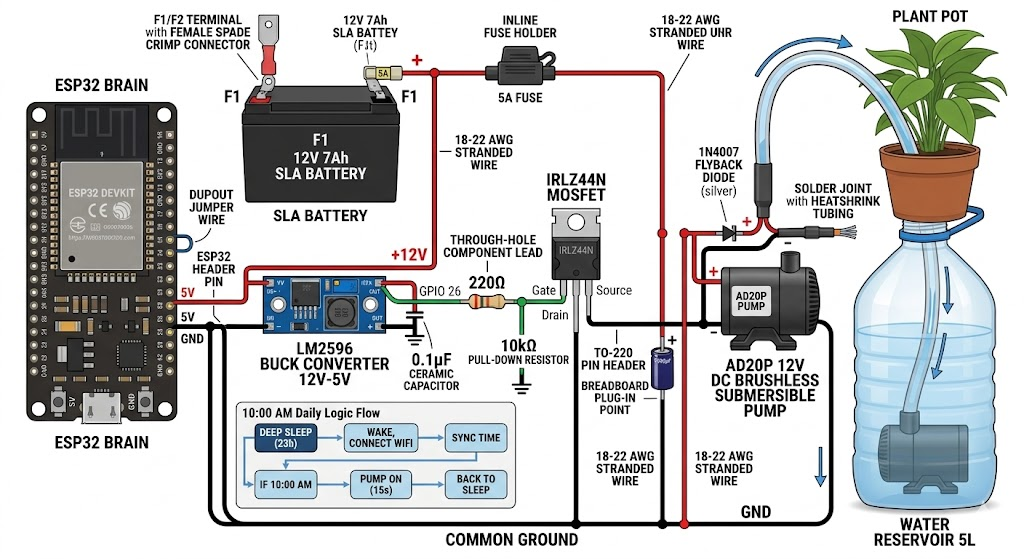
Takeaway: 3.3V vs 5V logic levels is the most important hardware concept. Simulate circuits in PySpice before buying. Add flyback diodes across any inductive load (solenoids, relays, motors).